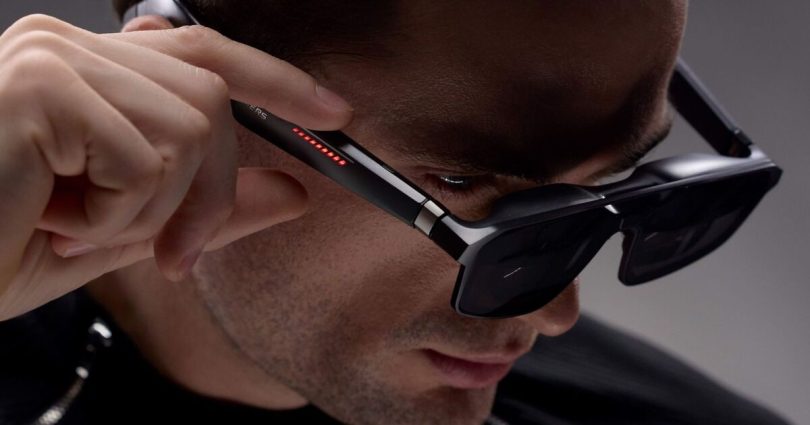


The ASUS ROG XREAL R1 glasses are a new way to play games on the go. (Image: ASUS)
I remember when I bought my first VR headset almost ten years ago now, and even though the technology felt cumbersome at the time, it felt revolutionary. The fact I could stick on a piece of headgear that mounted two screens directly in front of my eyeballs and completely transport me to another world was a novelty that didn’t wear off fast.
In the decade since VR took off, that same technology has only gotten better, and while the likes of PlayStation and Meta are still leading the way in terms of full-on headsets, the tech is starting to make its way into other, more refined, versions of the product. After spending two weeks getting to grips with the ASUS ROG XREAL R1 gaming glasses, I’m fully sold on the future of portable gaming being in the hands of augmented reality, to the point where I’m not sure both my gaming and work life will ever be the same again.
Let me clear right off the bat – the ROG XREAL R1s aren’t a VR headset. They’re a pair of spectacles that have a 1080p micro-OLED screen mounted in front of each eye.
Connect the glasses up to anything that can output both power and a video signal via USB C, and the glasses quickly boot into life to display the image on what appears to be a huge screen projected in front of you. The targeted use-case for this is portable gaming, with the R1s pairing beautifully with the ROG Ally X – or in my case, a Steam Deck.
ASUS does also include a hub station in the box that can take a couple of HDMI signals at once, opening the R1s for use with consoles like the PlayStation 5, Xbox Series X|S and Nintendo Switch 2 (while docked).
Using the intuitive controls on the right arm of the R1s, it’s possible to adjust the size and scale of the screen in front of you, making it appear either bigger, farther away, or both.
When you first put the specs on and power them up for the first time, it truly feels like magic. Your chosen output device immediately appears right in front of you, almost as if it’s a hologram out of Star Wars – especially with the electrochromic lenses set to their most transparent.
Things get truly immersive when you knock the transparency to opaque, blocking out almost all light from entering the glasses and leaving you with those deep, inky blacks that OLED screens can provide. The displays get incredibly bright too, with the maximum brightness more than necessary in dimly lit environments and even ideal for using outdoors.

The ASUS ROG XREAL R1 glasses provide a huge display while gaming on the go. (Image: Joshua Boyles)
You’ve got two options when it comes to how you want to display your content. The R1s can either keep the screen centred on your vision at all times, or pin it in 3D space so you can use your head to look around it.
Personally, I found the Follow mode to give me a bit of motion sickness – especially given the relatively narrow 57º field of view – but pinning the screen in 3D space felt much more natural. It also meant I was able to make the screen larger and use my head to be more intentional with where I was looking, resulting in a more immersive experience.
By default, the R1s accept a 1080p input, which looks extremely sharp when given the proper input signal. This is slightly too high for the Steam Deck which usually runs games at 800p, but I was happy to find that the R1s do a great job of staying sharp even when displaying a lower resolution image.
For audio, ASUS has teamed up with Bose to install speakers into the arms. They sound surprisingly good given their size, delivering hefty bass where needed and excellent stereo sound separation.
However, these are genuine speakers and not bone conduction tech, so there is some sound leakage at higher volumes. If you’re using them in a public space like on a train, your neighbour will hear the audio, so it might be best to revert to your trusty earphones in some cases.
I’m someone who enjoys playing my Steam Deck while lying down in bed, and although the OLED screen is an absolute dream to look at, it’s a heavy device to be propping up. With the R1s, I found myself comfortably playing for hours laid horizontally, essentially projecting the Steam Deck onto my ceiling.

Capturing the internal displays is tricky on camera, but they look fantastic in person. (Image: Joshua Boyles)
Despite the displays being mounted less than an inch from my eyes, I didn’t find myself getting too fatigued, although I wouldn’t have wanted to use them for longer than three hours in one stint. At 91g, they’re heavy for a pair of specs – but far lighter than you’d expect them to be for the technology packaged inside.
ASUS includes a couple of different nose pads in the box to get the right feel, and the arms have three levels of tilt adjustment to really dial in the fit.
In their standard mode, the ROG XREAL R1s can output at 1080p and 120hz – more than enough for handheld gaming, and it looks great doing so. There is a mode that can display 240hz, although this drops the resolution down to 540p per eye which does look noticeably softer. It was fun to test for one game of Counter-Strike, but not the way I’d see myself playing regularly.
A use-case that I didn’t expect myself to enjoy using the R1s for regularly was for productivity. As the glasses essentially operate as an external display, you can plug them into a PC or MacBook and use them as a secondary display.
This works remarkably well when setting the electrochromic lenses to swap to transparent when you look away from your pinned screen. In practice, I was able to pin a cinema-sized screen onto my living room wall which disappeared when looking down at my actual laptop screen, essentially creating a dual-monitor setup from the comfort of my sofa.
You can actually take this up another notch as although each eye will only ever display a 1080p image at once, you can set the specs to mimic a variety of display aspect ratios. I was delighted to discover that I could actually pin a super ultra-wide 32:9 display above my laptop, essentially having a three-monitor canvas to work on in the palm of my hand.

ASUS ROG XREAL R1 case compared to a normal spectacle case. (Image: Joshua Boyles)
This use-case does expose that 57º field of view slightly as the edges disappear on the edges when scanning across the virtual screen. However, I didn’t find this to be an issue in practice, especially as I was only ever focusing on what was in the centre of my vision anyway.
I did find that text can be a little fuzzy around the edges, which caused a couple of headaches during longer work sessions. However, I found it to be a far more comfortable way of working in AR compared to the likes of a Meta Quest or Apple Vision Pro, especially when you consider how light the device is.
As a glasses wearer, I was pleased to find that I was able to use the R1s over the top of my existing spectacles without too much issue. ASUS does include a prescription lens template in the box which you can take to the opticians to have made up in your own prescription.
I didn’t have a chance to get this done during my review period, but I can only imagine the experience would be enhanced even further if I were to spring for the upgrade, and it’s something I’m seriously considering if I’m to add the R1s to my permanent routine.
Perhaps the best part of the ROG XREAL R1s is how seamless they are to set up. A hardshell carry case houses both the specs and their USB C cable with it not taking up much more space than my existing spectacle case.
Once you’ve got your settings dialed in, it really is just a case of plug them in, stick them on, and you’re off to the races in a matter of seconds.
Over the last two weeks, I’ve taken the R1s out and about and used them in coffee shops to get some serious work done. I’ve also used them on a train to play my Steam Deck, all while playing on a massive screen inside a confined space without bothering anyone around me.
You do get some funny looks as they aren’t the most subtle of spectacles with significantly more bulk in the lens area. However, they’re a darn-sight more discreet than wearing something like the Apple Vision Pro in public, and vastly more portable.
Between my MacBook and my Steam Deck, I’ve gotten far more use out of this little gadget than I ever thought I would. It’s not just a fad that gets old quickly – the sheer immersiveness retains its novelty, and has genuinely made portable gaming – and working – something I’m more inclined to do.

The ASUS ROG XREAL R1 glasses look a little bulkier than normal sunglasses. (Image: Joshua Boyles)
The Verdict
At £749, they are a tough sell for most gamers, especially when you consider that they cost more than a Steam Deck or ROG Ally device itself. However, when you compare that price to some of the OLED monitors on the market and consider the form factor and use-case benefits, that price tag does become a little easier to swallow.
It might be a niche product, but if you’re someone who genuinely plays a lot of handheld PC games or likes the idea of being able to carry around a secondary display in your pocket, I can’t recommend the ROG XREAL R1’s enough.
Source link


